

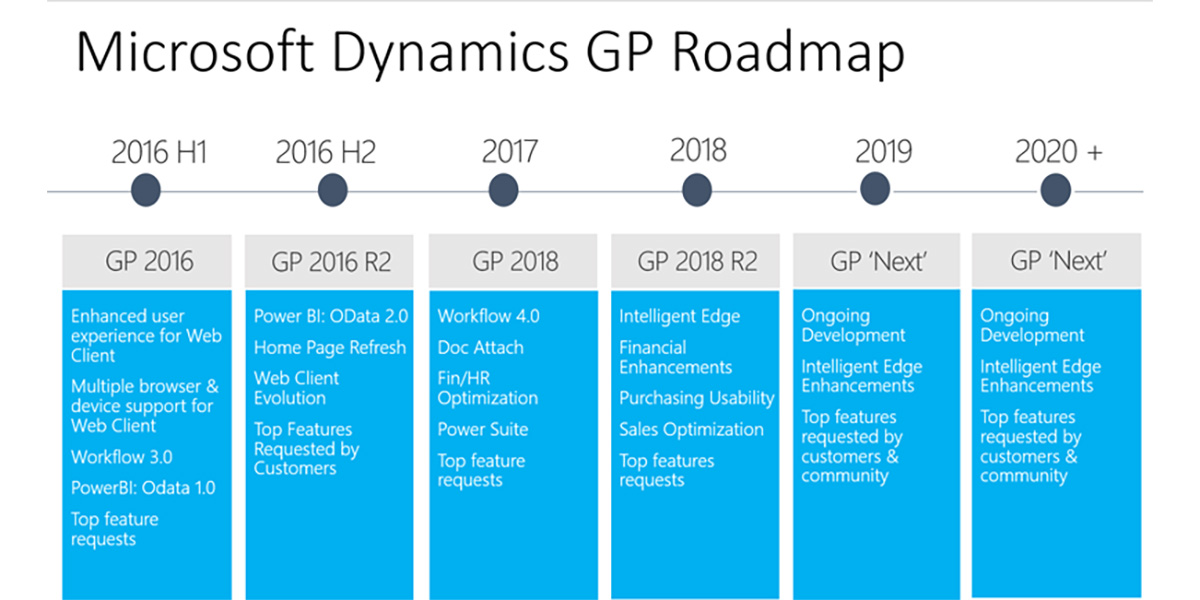
We have put together a summary of the enhancements to Dynamics GP for the Dynamics GP 2018 R2 release.
Financial enhancements
Monthly recurring batches
With the release of Dynamics GP 2018 R2, users can specify whether a monthly or bi-monthly recurring batch must end on the last day of the month in Payables, Receivables, and Inventory Management. When marked, the posting date is automatically set to the last day of the month (for example, May 31 instead of May 30).
Exclude zero-quantity or zero-value items on the HITB report
New options in the Historical Inventory Trial Balance report allow you to exclude items with zero quantity or zero value.
Transaction-level post through G/L
A new Posting Setup option lets transactions post through the general ledger at the transaction level in several windows when the “post through” flag is set.
Duplicate check numbers
In the Checkbook Maintenance window, you can now enable or prevent duplicate check numbers for Payables Checks, Bank Transaction Entry, Miscellaneous Checks, and Payroll Manual Check-Adjustment Entry by setting or clearing the “Duplicate Check Numbers” field.
Hide inactive checkbooks in lookup
In the Checkbooks Lookup window, you can choose to exclude inactive checkbooks to simplify batch defaults and lookups.
Bulk update master records
From any Navigation List, users can now inactivate or reactivate master records for accounts, checkbooks, customers, salespeople, vendors, employees, and items. Employees can also be inactivated one at a time directly from the list.
Purchasing enhancements
Checkbook ID defaults on computer check batches
When creating a computer check batch in the Select Payments, Edit Payment Batch, or Batch Entry window, the Checkbook ID now defaults based on your Payables Management Setup.
Partial purchase from requisition
Purchase orders created from requisitions can now use a quantity less than the total requested, allowing partial fulfillment.
Vendor document number in All-In-One View
The Purchasing All-In-One Document View now shows the vendor’s document number (Applied-To Document Number) for payments, credit memos, and returns, making it easier to match related transactions.
Send PO using alternate template
In Purchase Order Entry and Inquiry Zoom, you can now choose “Other format” when emailing a purchase order, allowing different templates for different vendors.
Vendor hold warning
If you enter a payables transaction for a vendor on hold, a visual indicator appears and a warning message is displayed, similar to the existing customer-hold feature.
Sales enhancements
Retain Ship-To Address name on customer modify
The Ship-To Address Name is now retained when using the Customer Combiner and Modifier Utility.
New SmartList: Deposits on unposted sales
A new SmartList under Sales Transactions shows deposit amounts associated with unposted sales orders and invoices, filtered to SOP10100 transactions with a Deposit Received amount greater than zero.
Additional sort options in Sales Order Processing Item Inquiry
You can now sort the scrolling window by Item Number, Document Number, Document Type, Document Date, or Customer ID; Item Number is the default sort.
Print in functional or originating currency
From the Sales Order Transactions Navigation List, choose whether to print documents in the Originating or Functional currency via the “Currency To Print” field.
Print and email sales documents simultaneously
You can now print and email sales documents in one step in the relevant windows.
Email customer statements
The Customer Maintenance window now includes a button to email statements directly.
Human resources & payroll enhancements
Payroll Check Register FICA totals
The Payroll Check Register report now shows both employee and employer FICA totals: FICA Medicare and FICA Social Security.
New fields in Payroll Check Register
Two calculated fields—“FICA Med Total Owed” and “FICA Soc Total Owed”—have been added to the Payroll Check Register report for pre-posting and during the Payroll Computer Check process.
Start and end dates for pay codes
Pay codes in Employee Maintenance can now have start and/or end dates, similar to benefits and deductions, allowing automatic activation and inactivation.
Shared maximums for benefits and deductions
You can assign a shared calendar-year maximum for groups of benefits or deductions, useful for employees contributing to multiple plans.
Workflow enhancements
Dynamics GP 2018 R2 introduces a Sales Transaction Approval workflow. You can create approvals based on conditions (for example, credit-limit exceedance), send workflow emails, and view workflow history in inquiry windows.
System enhancements
Password maximum length
The maximum password length has increased from 15 to 21 characters.
Password expiration notification
Users now receive a notification 7 days before their login password expires, allowing proactive updates.
Hide Business Analyzer
System Preferences now include global settings to hide Business Analyzer on the Home Page and in navigation lists.
SmartList Designer favorites
Favorites created in SmartList Designer now appear automatically in the SmartList Favorites navigation lists.
Intelligent Cloud Insights
A new “Intelligent Cloud Insights” tab on the Home Page lets you connect GP to a Business Central tenant for machine-learning insights.
For a complete list of new features, see What’s New in Dynamics GP 2018 R2.